Friday, 4 September 2015
 |
||||||||||||||||||||||||||||||||
|
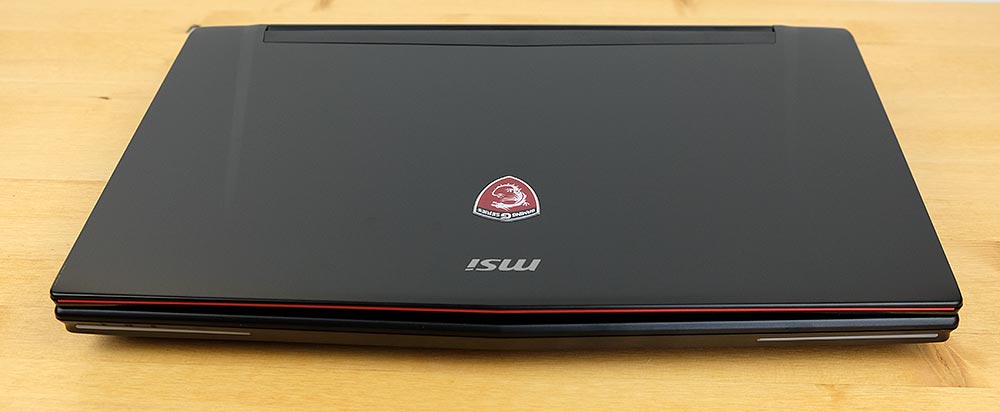
The MSI GT72 Dominator Pro G is that cutting edge gaming laptop with a drool-worthy list of up to the minute components and features that you'd expect
from a boutique brand. There's no last gen CPU here; you get the Intel
5th generation Broadwell CPU most gaming laptop manufacturers skipped
since it was so delayed. It runs Windows 10 out of the box- you don't
have to upgrade it. MSI has been on an impressive roll this year and
they've been refreshing their specs like mad to upgrade to the new CPU
line, include NVIDIA graphics cards at launch and now they've added USB
3.1 and G-Sync for better gaming visuals in the latest Dominator Pro.
The MSI GT72 Dominator Pro G-1666 is the new version of MSI's 17.3"
desktop replacement and gaming laptop. The Pro G model runs on the Intel
Broadwell 5th generation quad core i7-5700HQ 2.7 GHz CPU with Turbo
Boost to 3.5 GHz. The "G" stands for NVIDIA G-Sync technology that syncs
the graphics card and display refresh rates to reduce visual tearing.
It has a lovely 17.3" matte IPS 1920 x 1080 display with a 75Hz refresh
rate.
The Dominator Pro G is available with
the NVIDIA GTX 980M 4 GB DDR5 (our $2,099 model) or the GTX 970M 3 GB
DDR5 in the $1,499 model (MXM upgradable graphics cards for both). It
has 16 gigs of RAM in 4 slots (32 gigs max unless you go with 16 gig
modules), 4 M.2 SSD slots (available in RAID0) and a 1 TB, 7200 RPM HDD.
The laptop has a SteelSeries full color backlit keyboard, Killer WiFi
802.11ac and Ethernet, stereo Dynaudio 3 watt speakers and subwoofer,
and a Blu-ray burner. The 8.4 lb. laptop has a black aluminum lid and an
easily removable plastic bottom panel for upgrades. It competes with
the Asus ROG G751 and Alienware 17. It's well worth a look if you want
cutting edge specs in a cool and quiet laptop that doesn't throttle.
Design and Ergonomics
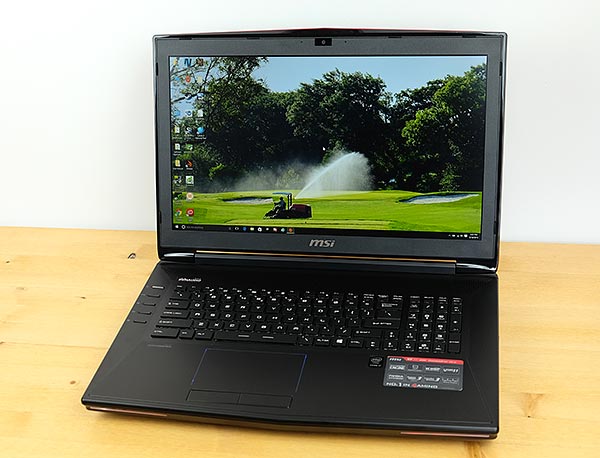
Esthetically, I'm neither a fan of nor
displeased with MSI's gaming laptop designs. It looks a bit more like a
traditional laptop rather than an overstated gaming rig (good for work,
not as much fun at gaming parties). They have achieved a design
uniformity: the super slim and light GS60 Ghost Pro and the Dominator
GT72 are recognizably from the same line now. The sleeker GT72 is a
great esthetic improvement over the older GT70 line, and its 1.89"
thickness suits the machine's overall dimensions so it doesn't look
super-chunky. Like Asus with the ROG G751, MSI hasn't gone overboard
with slimming the laptop as Alienware did with their 2015 models. The
MSI and Asus G751 might not be as slim as the 1.34" thick Alienware 15
and 17, but we're OK with that because there's plenty of room for
larger, quieter fans and more cooling inside. That means the laptop is
nearly silent when doing productivity tasks, streaming 1080p video and
working with pro apps like Adobe Photoshop and even Premiere Pro. When
gaming the fans are audible, but they aren't what I'd call loud. The
keyboard never rises above human body temperature and the bottom remains
cool enough for use on the lap (though at 8.4 lbs. you may find it
tiring on the legs).
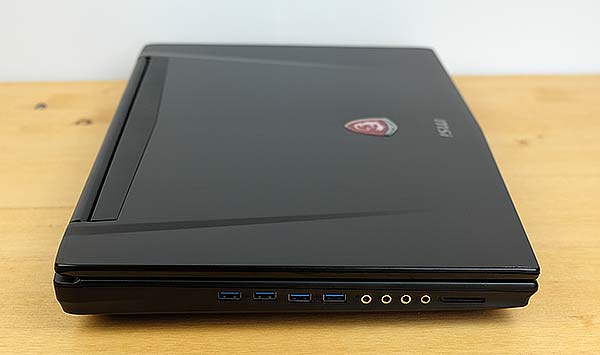
The lid is black brushed aluminum and it
attracts fingerprints aplenty. The rest of the casing is durable black
plastic. The keyboard deck's front edge is rounded so it doesn't dig
into the wrist or hands, but it lacks Alienware's and Asus ROG's elegant
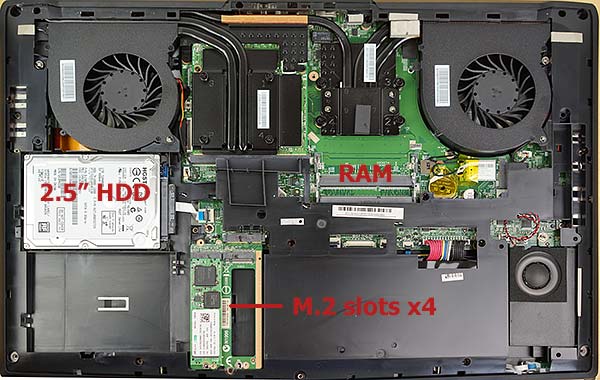
soft touch finish. The bottom panel is removable and grants access to a
plethora of upgradable internals: a 2.5" SATA drive bay, 4 M.2 2280 SSD
slots with SATAIII for RAID0 compatibility, 4 RAM slots, a socketed M.2
wireless card and an MXM graphics card slot. MSI continues to use thin
lids, so there's some flex if you bend the panel intentionally- why
would you do that, though? The hinges are adequate but not as
bounce-resistant as Alienware's super-stiff display mounts.
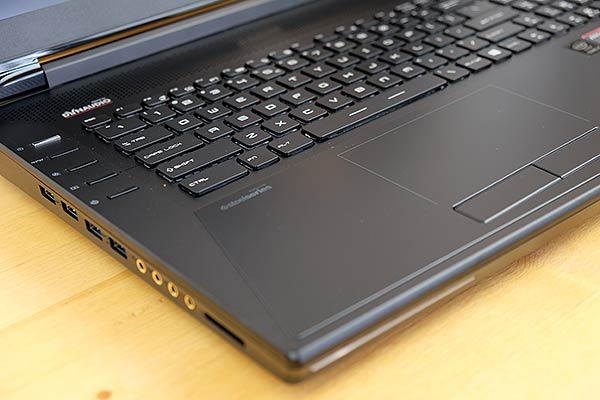
As with previous MSI gaming models, you
get multicolored LED lighting with 3 keyboard zones, front edge lights
and a light-up MSI dragon logo on the lid. You can customize the colors
or turn off backlighting when you want to be subtle at work. The
keyboard deck has 4 quick access buttons, one of which cycles through
the 4 LED lighting presets, another that sets the fans to max (I can't
imagine needing to do so), a button for switching between integrated and
dedicated graphics and a program launcher. The top button is the on/off
switch.
MSI gaming laptops have excellent
speaker systems that are louder and fuller than other gaming laptops.
The Dynaudio 2.1 speaker system has 3 watt stereo speakers and a
subwoofer. MSI switched from the very good Creative Cinema 2 software to
Nahimic. I have no qualms with the switch though some users prefer the
old solution. The machine has four 3.5mm audio jacks: 1 headphone/SPDIF,
1 mic, 1 stereo line in and 1 line out for speakers and surround sound
systems.
Ports abound on this big machine: 4
audio, 4 USB 3.0 ports, 2 USB 3.1 ports (standard USB connector rather
than USB-C), HDMI, 2 mini DisplayPort, Gigabit Ethernet and an SD card
slot. Killer E2200 Ethernet and Killer 1525 WiFi 802.11ac are standard.
SteelSeries Keyboard and Synaptics Trackpad
Thankfully MSI has moved away from the
simply awful Elan trackpads of old. Synaptics makes excellent trackpads,
but somehow MSI has found a way to make it less than perfect. Tracking
reliability and accuracy are excellent and pinch zooming works well, but
two-finger scrolling works only 50% of the time. Perhaps we'll get a
firmware or BIOS update to improve this: our machine already got one
that improved trackpad performance a bit. The trackpad is delineated by
an LED outline, but there's no physical separator (it's one with the
deck). That means your finger can wander off the trackpad, but it's
large enough that this didn't happen often. The trackpad has two buttons
(plus), but they're much too stiff (minus).
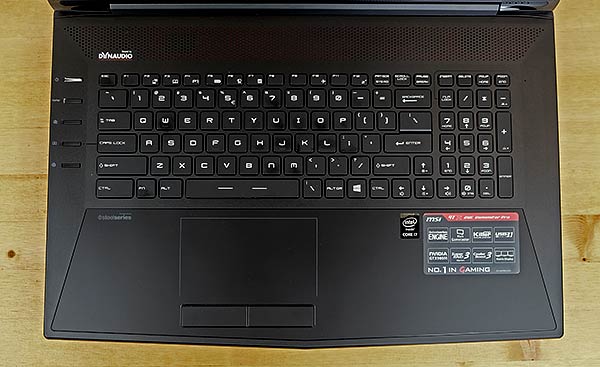
The SteelSeries Chiclet keyboard is
excellent. I confess to slightly prefer the Alienware keyboard, but the
MSI has deep key travel, is uniform in required pressure and as promised
it doesn't ghost in games. The keys are a bit small for a 17" laptop
and the number pad is crammed close, but overall this is a keyboard
that's a pleasure to type on at length and it works perfectly in games.
Display and G-Sync
Good times, we have a 17.3" IPS display
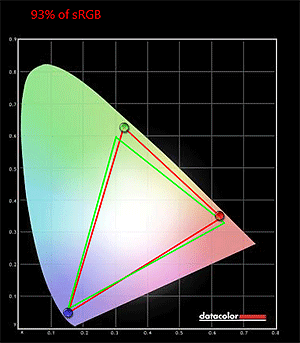
with 75Hz refresh rate and a good color gamut of 93% sRGB and 72% of
Adobe RGB. Color tuning out of the box on the default sRGB mode was
quite good and was suitable for professional graphics work and photo
editing. It's also very bright at 323 nits and since it's a matte
display it seems even brighter because it doesn't have to fight glare.
This is a non-touch display with a resolution of 1920 x 1080. Black
levels are average at 0.48 at max brightness and contrast is good at
670:1, but not as high as the 2015 Alienware models. 17" laptop displays
don't get the R&D love that 13 and 15 inch panels do, so there are
no 3K or 4K panels commonly available on the market as of this writing.
MSI standardized on the LG IPS panel
with high refresh rate to comply with NVIDIA G-Sync requirements. What's
G-Sync? It keeps the video card and display refresh rates in sync to
reduce screen tearing and make gaming graphics look smoother overall.
It's very effective and a better solution than Vsync that artificially
caps games at 60 HZ (since that's a common display refresh rate). It's
effective, and even when playing at lower frame rates games are playable
thanks to the smoothness and proper syncing of screen with the game.
Horsepower, Performance and Temperatures
It's chillin' here: MSI has been making
gaming motherboards, graphics cards, laptops and desktops for some time,
and their expertise with cooling is impressive. The MSI GS60 Ghost Pro
impressed us with its quad core i7 and GTX 970M graphics in a crazy
slim, 4.5 lb. chassis--it got (relatively) hot and loud but has kept on
ticking for 9 months since I bought it. With the much roomier and
thicker 17" chassis on the GT72 Dominator line, MSI has room for larger
fans that are both effective and quieter. There's also plenty of room
for heat sinks and pipes, so this machine runs impressively quiet and
cool despite being one of the most powerful laptops on the market. If
you can bear the weight, the GT72 with the top of the line NVIDIA GTX
980M graphics card stays cool enough to game with the notebook on your
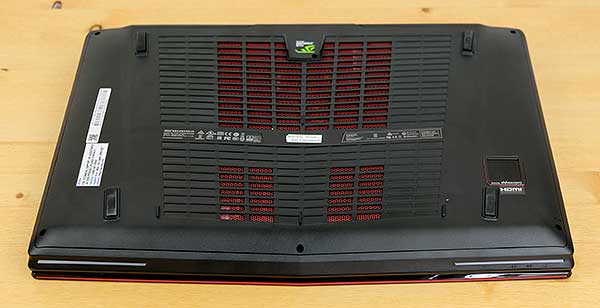
lap (it helps that heat is vented through the back edge). You won't need
to crank up the volume from the excellent Dynaudio 2.1 speaker system
to drown out the fans. Sweet. When gaming with today's most demanding
titles the CPU cores rarely passed 65 C, and the GeForce GTX 980M ran at
54 to 70 C. That's well below the thermal ceiling and we saw no thermal
throttling even after an hour of gaming. Though the machine is quiet
and relatively cool, I do suggest using a passive laptop cooler that
keeps the bottom air intakes clear--it reduces CPU and GPU temps up to
10 C. The 230 watt power supply is adequate for this graphics card, so
it doesn't throttle to reduce power consumption when plugged in.
Broadwell 5th generation 47 watt quad
core CPUs have been almost a no-show since Intel delayed them so long
(soon, Skylake 6th gen will be announced). Better late than never, and
we're glad that MSI chose to release laptops with the Core i7-5700HQ.
This is a standard laptop BGA CPU that's soldered on board since Intel
no longer makes socketed laptop processors (these were only used on a
handful of high end gaming laptops, so we can understand why Intel
didn't find it economically worthwhile). The 2.7 GHz CPU has Turbo Boost
to 3.5 GHz and it can maintain that boost without throttling early.
Broadwell represents a 5% performance gain over Haswell, and more
important for laptops, it's a cooler and more power efficient 14nm CPU
vs. Haswell's 22nm (Skylake and the next gen Kaby Lake will also be
14nm). That said, it's not a night and day difference from Haswell, but
every little bit helps. Skylake should bring another 5% performance
improvement but likely little new in the cooling department. For those
of you who thought this paragraph was techno mumbo-jumbo, here's a quick
translation: this laptop currently runs the latest generation quad core
laptop CPU, and it's one of the very few to do so as of this writing.
It's extremely fast and this laptop can handle the most demanding tasks
from video editing to 3D gaming and CAD. You won't find a laptop
appreciably faster than this.
The Dominator Pro G is available with
your choice of a GeForce GTX 970M 3 GB DDR5 or the GTX 980M 4 GB DDR5 in
our review unit. Both are latest generation Maxwell architecture and
support NVIDIA G-Sync. The 980M is the fastest and most expensive
graphics processor in this generation of NVIDIA graphics cards. Expect
to play today's top titles on high settings and 1920 x 1080 resolution
at 60 fps or higher. It can play quite a few games on ultra settings. If
you want the best money can buy, the Pro G and the much more expensive
18.4" MSI GT80 Titan are it in MSI's lineup.
Benchmarks
PCMark 8 Home: 4432
wPrime: 10 sec. Geekbench 3: 3586/14,144 Unigine Heaven (1080p, high, DX11, AA off, no tess) 73.1 fps, GPU temp 72 C Cinebench R15: OpenGL 74.2 fps
3DMark 11: P11,032, X4243
3DMark Tests:
Fire Strike: 8402 Cloud Gate: 13,414
Battery Life
As with the 2015 Alienware 15,
battery life doesn't have to suffer greatly just because you're using a
big gaming rig. The MSI has a dedicated hardware button for switching
between Intel HD 5600 integrated graphics and the NVIDIA dedicated card.
After you press the button, the machine will restart rather than
switching on the fly using NVIDIA Optimus (we're told this has to do
with G-sync support). I actually don't mind having control over graphics
because I can ensure that I'm using faster dedicated graphics when
needed, and be sure that the machine won't switch to power hungry
dedicated graphics when on the go away from an outlet. When using
integrated graphics with brightness set to a very adequate 40% and WiFi
active, I averaged 6 hours of actual use time in productivity and 1080p
video streaming tests. That's simply marvelous for a quad core 47 watt
CPU and a big 17" display.
The good news is that MSI includes
a proper 230 watt power adapter that provides enough juice to prevent
battery drain when gaming plugged in. Occasionally we see a gaming
laptop with a high consumption GPU like the GTX 880M or 890M with a 180
watt power supply and that results in power based throttling to prevent
battery drain. No such problem here. The GT72 has a 9 cell battery
that's sealed inside. While most upgrades are easy once you remove the
bottom panel, the battery is hidden under a plastic shield and it takes
additional work to access it should you need to replace it in the
future.
| ||||||||||||||||||||||||||||||||


